
AWS AI Applications: When AWS Is the Right Cloud for AI

Contents
Contents
Most companies have already moved past “Should we try AI?” and are now asking a tougher question: how to run it reliably, securely, and at a cost that still makes sense next year. At that point, the cloud platform you choose stops being a background detail. It affects how quickly you can transition from prototype to production, how easily you can control costs, and how challenging it will be to meet security and compliance requirements.
Amazon Web Services (AWS) is often the default choice for AI infrastructure. In the AWS and AI space, it holds a significant market share, boasts a robust ecosystem, and has a long-standing history of providing data and analytics services. But that doesn’t automatically make AWS the best answer for every AI initiative. Sometimes Azure or Google Cloud is a better fit, sometimes a multi-cloud or hybrid setup is more realistic.
In this article, we’ll examine AWS AI applications, explain what AWS offers for AI, when it makes strategic sense to leverage it, when another platform may be more suitable, and where external expertise is required.
What AWS Really Offers for AI and Machine Learning
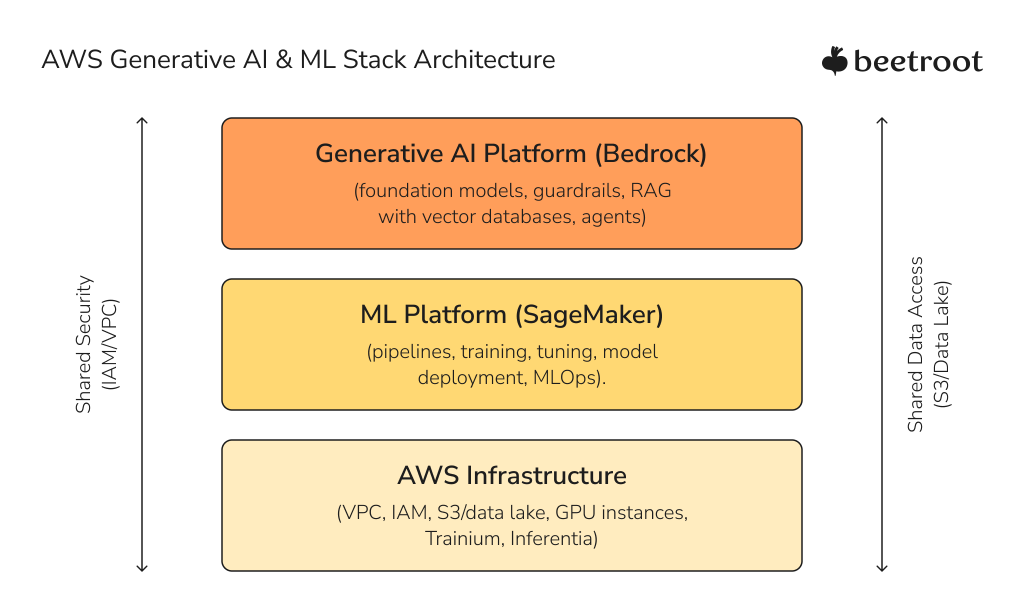
You can run AI workloads on any central cloud or even on-premises hardware. What makes AWS distinct is how AWS and Machine Learning services sit on top of a broad, relatively mature platform for data, infrastructure, and operations. Instead of thinking in terms of individual products, it’s more practical to consider a few core factors: MLOps maturity, generative AI capabilities, specialized hardware, and cost, as well as how well everything integrates with your data estate.
Factor 1. Maturity of the MLOps Ecosystem (Amazon SageMaker)
Amazon SageMaker is the backbone of AWS’s traditional machine learning story. AWS AI capabilities stand out because they sit atop a broad data and infrastructure platform. Rather than listing every service, it’s more useful to consider four factors: the maturity of the MLOps ecosystem, the generative AI platform, specialized hardware, cost optimization, and how well everything ties into your data estate.
If your organization has several teams working with AI, AWS SageMaker helps by providing a standard way to do things. Rather than each team coming up with its own methods for preparing data, tracking experiments, and deploying models, everyone follows the same process. This makes it easier to manage everything, since you can track which versions are in use, who made updates, and how each model was trained.
SageMaker is most effective when organizations use its recommended workflows. If a company already has a strong internal platform built on Kubernetes and open-source MLOps tools, or prefers to stay cloud-agnostic, SageMaker often serves as an additional layer. In these situations, AWS provides dependable infrastructure, while the internal platform handles most provider-specific tasks.
Factor 2. Generative AI Platform (Amazon Bedrock)
AWS Bedrock helps teams launch generative AI solutions fast, without the need to handle large models themselves. It provides a range of foundation models through managed APIs, plus guardrails, evaluation tools, and features for retrieval-augmented generation and agents.
For tech leads, the main advantage is the platform itself, not just the individual models. Bedrock lets you choose from different model families, connect your own data sources, and manage safety and compliance in one place.
This streamlines the development of internal copilots, knowledge assistants, and customer-facing chatbots that adhere to security requirements.
In practice, teams rarely choose AWS Bedrock vs SageMaker. Instead, they frequently combine them. Bedrock is suited for conversational and document-focused applications using managed models, while SageMaker addresses workloads requiring greater control, such as tabular prediction, forecasting, optimization, or custom architectures. The decision depends on the required level of control, rather than competition between platforms.
Factor 3. Hardware and Cost Optimization (GPU, Trainium, Inferentia)
Training and running modern AI models is expensive, so a well-planned hardware strategy is crucial. AWS offers the standard GPU instances that most teams typically start with, and adds its own chips for customers with larger or more demanding workloads.
Trainium is designed to train large models more efficiently, while Inferentia focuses on reducing the cost of high-throughput inference. If you are running the same model at scale for an extended period, investing effort in migrating to these chips can shift your cost curve and free up budget for additional experiments or features.
For most organizations, the first improvements come from picking the right instance sizes, turning off unused environments, using spot or reserved capacity when it makes sense, and making sure experiments do not run longer than needed. Specialized chips become important only after your architecture and workloads are stable enough to make further optimization. Until then, standard GPU instances offer enough flexibility and portability, whether you use only AWS or work across multiple cloud providers.
Factor 4. Data Integration and Gravity
AI projects only work if they can access the correct data at the right time. AWS’s wider platform plays a key role here. Services such as S3, Glue, Lake Formation, Redshift, Athena, and different vector-store options create a data layer that most AI workloads rely on. Teams tend to focus more on models than on storage, but storage is just as important.
If your operational systems, event streams, and analytics are already in AWS, it’s typically easier to run AI there as well. This setup eliminates the need for data movement, reduces egress costs, and allows you to utilize your existing identity and access controls. These benefits are significant in regulated industries, where tracking data flows and being able to audit them are just as crucial as model accuracy.
If your primary data warehouse and BI stack are firmly rooted in another cloud, the picture changes. If your main data is in BigQuery or Azure Synapse, building AI on AWS will be more complex. It is possible, but you need a clear plan for replication, latency, and governance. In these situations, AWS is just one part of a larger multi-cloud approach, and you should pay close attention to the “data gravity” of your current platform.
When AWS Is a Strong Choice for AI
There are many ways to compare clouds, but in practice, a few patterns consistently emerge when we examine real projects.
The first and most common case is simple: your company already runs the bulk of its systems on AWS. If your transactional applications, data lake, analytics, and security tooling are all there, moving AI workloads to another cloud usually creates more complexity than it solves. Keeping AI close to your operational and analytical data avoids cross-cloud latency and egress costs, lets you reuse identity and access controls, and reduces the number of teams that need to become experts in multiple platforms.
The second case is when you are consolidating AI efforts. Many organizations begin by establishing separate teams that run their own experiments, such as using notebooks, testing APIs, or building small prototypes. Eventually, leaders seek more control, shared standards, and improved cost tracking. Using a managed AI platform, such as SageMaker, along with Bedrock, helps bring everything together. Teams can keep innovating, but now within a clear system that makes it easier to monitor, track versions, and deploy reliably. For tech leads, the focus often shifts from features to building good operational habits.
A third situation where AWS stands out is in generative AI on AWS for enterprise use cases that need strong guardrails. If you plan to add internal copilots, knowledge assistants for sensitive documents, or customer-facing agents, Bedrock offers a strong mix of model options, safety tools, and AWS security features. That doesn’t mean other clouds can’t do the same, but if your information already lives in AWS, building there keeps the architecture tighter.
Ultimately, AWS remains a strong option for global deployments, particularly when you need to cover multiple regions with varying regulatory requirements. The combination of numerous areas, a mature compliance portfolio, and established operational practices can simplify operations for companies that operate across continents.
Where AWS and Machine Learning Fit Naturally Together
Beyond checklists and feature comparisons, many teams choose AWS in AI because it aligns with their existing approach to system building. AWS usually launches basic building blocks first and later combines them into more advanced services. This method works well for engineering teams that prefer to start small, create a working solution, and then adopt clearer patterns as they expand.
For example, a company may start with one model behind an API and later add features like automated training, monitoring, and logging. As these steps become routine, new projects can use them as templates. Since all the services are on the same platform, it is easier to avoid the problems that come with combining different tools.
Of course, the same richness can become a weakness. AWS offers many overlapping services, and there are often multiple ways to achieve the same result. Without experienced architects, it’s easy to end up with a solution that technically works but is hard to operate or unnecessarily expensive. Engaging an AWS consultancy or custom AI development partner can help design a sustainable architecture.
Use Cases Where AWS Often Excels
Different clouds have different strengths. Here are a few types of AI projects where AWS tends to be a solid match.
Use case #1. Data-rich predictive analytics
If you already keep years of transactional or operational data in S3 and use analytics services, you can easily connect that data to SageMaker models. This approach lets you build churn prediction, demand forecasting, or risk models without moving data between platforms. You can also keep using the same data governance and access controls that protect your current systems.
Use case #2. Personalization and recommendations
The e-commerce or media companies rely heavily on ranking and recommendation algorithms. On AWS, you can combine streaming services with real-time model endpoints and feature stores, gradually improving models without rewriting large chunks of infrastructure each time.
Use case #3. Industrial and IoT
If you already use AWS for connecting devices and processing data at the edge, AWS for Machine Learning becomes a natural extension for tasks like anomaly detection or predictive maintenance. You can run models either at the edge or in the cloud, based on your needs for speed and data use. Training pipelines rely on data collected over time.

Looking Ahead: The Direction of AI on AWS
AWS is clearly investing heavily in AI along three axes: hardware, models, and orchestration.
On the hardware side, newer generations of Trainium and Inferentia aim to make training and inference more cost-efficient for large language models and other demanding workloads. Whether this matters to you depends on your scale, but it’s a sign that AWS wants to compete seriously at the infrastructure layer rather than relying only on generic GPUs.
In terms of models, AWS continues to expand the range of foundation models available through Bedrock, including its own families and those from other vendors. This “model marketplace” approach is helpful for organizations that want flexibility: you can test different models for various tasks without altering your infrastructure or undergoing a new procurement process each time.
The third trend is a gradual shift from single-model usage to agentic workflows. AWS is adding tools for building multi-step processes, integrating with external systems, evaluating results, and enforcing guardrails. For tech leads, the interesting part is not the buzzwords but the potential to turn brittle, one-off prototypes into repeatable, maintainable systems that interact with real business processes.
When AWS Might Not Be the Best Fit
A balanced view also means acknowledging where another platform may be a more natural choice.
If your organization relies on Microsoft tools for identity, collaboration, and business applications, Azure usually works better. Power BI, Microsoft 365, Dynamics, and Azure Active Directory all connect well, so Azure AI services feel like a natural part of your setup.
In the same way, if your data and analytics teams mainly use Google Cloud, with BigQuery as the main warehouse and Vertex AI for testing, moving AI work to AWS means more data transfers and learning new skills.
You may also decide that strong cloud-agnostic requirements push you toward a different approach: for example, building your own portable AI stack on top of Kubernetes and treating the cloud provider primarily as a place to run compute and store data. That doesn’t rule out AWS, but it changes which of its services you use and how much you lean on platform-specific features.
Finally, some roadmaps depend on unique capabilities of a specific cloud provider or on tight integration with a particular SaaS platform. In those cases, you may choose a provider based on a single critical feature or partnership rather than on generic AI capabilities.
Making the Decision: Practical Considerations for Tech Leads
Choosing AWS for AI is a strategic decision. This option is a good fit if your main systems and data are already in place, you want a managed platform instead of building your own, and you expect AI workloads to be important in your future plans.
If you see AI as deeply tied to Microsoft-centric business tools, or if your analytics backbone lives in Google Cloud, or if you are intentionally avoiding any strong dependency on a single provider, then AWS becomes one option among several rather than the default.
In all of these scenarios, what many teams need most is not another feature comparison table but a structured conversation. A brief architecture and discovery workshop with a partner who knows both AI and cloud can help you see where AWS makes sense, where it does not, and what steps you need to take to build a production-ready AI platform. If you want a quick second opinion on AWS for AI, Beetroot can help. Contact us to discuss your goals and map the next steps.
FAQs
What kinds of AI applications usually fit AWS best?
Applications that sit close to existing AWS data and systems benefit the most: predictive analytics over operational data, recommendation engines, industrial monitoring, and generative assistants that use internal documents. You avoid moving data between platforms, keeping governance simpler.
Is AWS cheaper for AI than other clouds?
It can be, but only if you use it sensibly. Specialized chips and pricing models can reduce the cost of large, stable workloads. For smaller and more experimental projects, the biggest savings usually come from shutting down unused resources, choosing simple architectures, and closely monitoring usage.
How mature is AWS for MLOps?
SageMaker and related tools give you a solid starting point for experiment tracking, pipelines, and deployment. Many organizations use them as the backbone of a shared AI platform. Others prefer to bring their own stack and use only the basic AWS infrastructure. Both approaches are viable; the choice depends on how opinionated you want the platform to be.
Is AWS safe for sensitive data in AI scenarios?
AWS provides the building blocks for secure and compliant systems: encryption, fine-grained access control, private networking, and a wide range of certifications. Services like Bedrock are designed with enterprise isolation in mind. But design and process still matter more than any single feature. Poorly planned architectures can be insecure on any cloud.
Can AWS support a global AI rollout?
Yes. AWS’s region footprint and networking tools enable the deployment of models close to users in multiple parts of the world. The key tasks are deciding which data must remain local, defining a clear regional strategy, and setting up monitoring and governance that work across all these environments.
Subscribe to blog updates
Get the best new articles in your inbox. Get the lastest content first.

Recent articles from our magazine







Contact Us
Find out how we can help extend your tech team for sustainable growth.