

Contents
Contents
“Should we move to the cloud?” treats migration as a destination rather than a tool, and that framing tends to produce one of two bad outcomes. You migrate everything because it feels modern, then spend eighteen months wrestling with bills that bear no resemblance to the original estimate. Or you stay on-premise because change feels risky, and the maintenance load gradually chews through your engineering capacity.
The cloud and on-premise decision is a business choice wearing technical clothing. What follows is how to approach the cloud vs. on-premise comparison without the marketing spin, including the cost realities most write-ups skip.
Core Differences: Cloud and On-Premise for Business
The difference between on-premises and cloud infrastructure is simpler than the industry makes it sound.
On-premise means you own the entire physical setup. Servers, storage, and networking gear sit in your data center or colocation facility and are managed directly by your team. You design the architecture, handle outages, and budget for hardware refreshes when equipment ages out. In short: full control, full responsibility.
Cloud means a provider owns and operates the underlying physical infrastructure. You rent what you need and pay monthly. How responsibility is divided above that layer depends on the service model, while your organization still retains responsibility for areas such as data, identity, application configuration, and access controls.
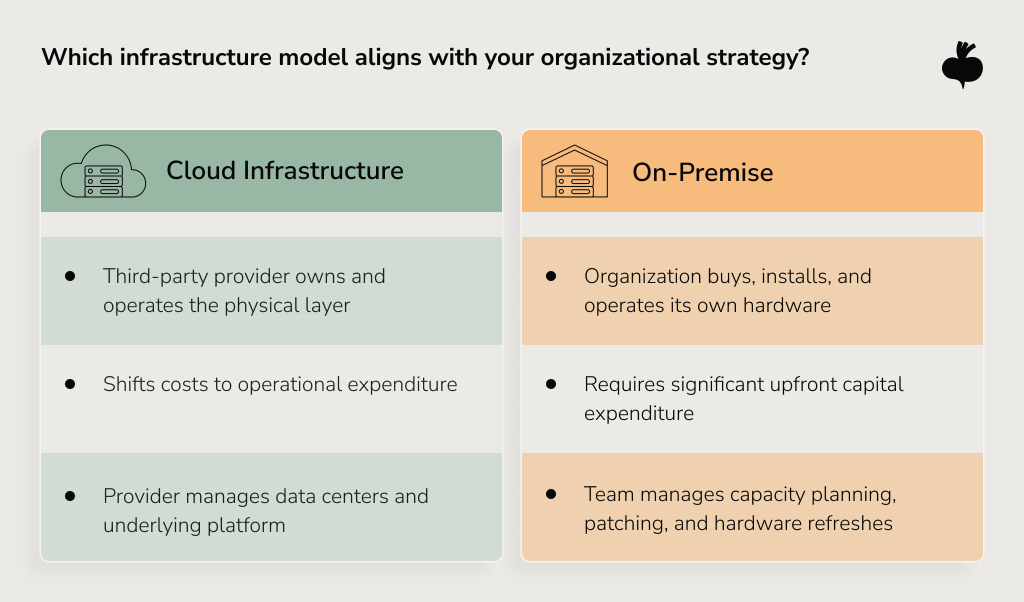
So what is the difference between cloud and on-premises in business terms? It comes down to where financial risk sits, how operational complexity gets distributed, what skills your team needs, and which constraints you’re committing to live with. The hardware question is almost incidental.
On-Premise vs. Cloud Cost Comparison
The on-premise vs. cloud cost comparison is probably the most widely misread analysis in infrastructure planning. And it gets misread in both directions.
The cloud-is-always-cheaper narrative has been doing real damage for years. Cloud can be the cheaper option, but only under specific conditions. The CFO who rules out cloud because “we already own the servers” is often ignoring what those servers actually cost to run.
On-premise is a capital expenditure (CAPEX) model: meaningful upfront spend on hardware, networking, licenses, and physical build-out. Then come ongoing costs that are easy to underestimate: hardware support, power and cooling, data center or colocation space, staffing, and eventual hardware refreshes.
Cloud typically shifts more infrastructure spend toward operational expenditure (OPEX) and usage-based billing, with the ability to scale capacity when the architecture and services support it. Highly variable demand can favor cloud economics when workloads can scale capacity up and down effectively, because on-premises infrastructure may otherwise have to be provisioned for infrequent peaks.
But cloud pricing is also outside your direct control. Providers can change service prices, discount structures, or licensing terms over a workload’s lifetime, so a TCO model should test how sensitive the result is to pricing and usage changes.
None of this makes the cloud the wrong choice. It makes the cloud vs on-premise cost question genuinely workload-dependent. A multi-year total cost of ownership (TCO) analysis is a better basis for the decision than comparing hardware prices or monthly cloud bills in isolation. Beetroot’s cloud migration services build cost modeling into discovery for exactly that reason.
Data Security On-Premise vs. Cloud: Where Is Your Data Safer
Two things are true about cloud security simultaneously, and they’re worth sitting with.
Cloud security failures can also originate on the customer side, including misconfigured storage, excessive permissions, exposed credentials, and insecure application settings. That is why the shared-responsibility model matters in practice.
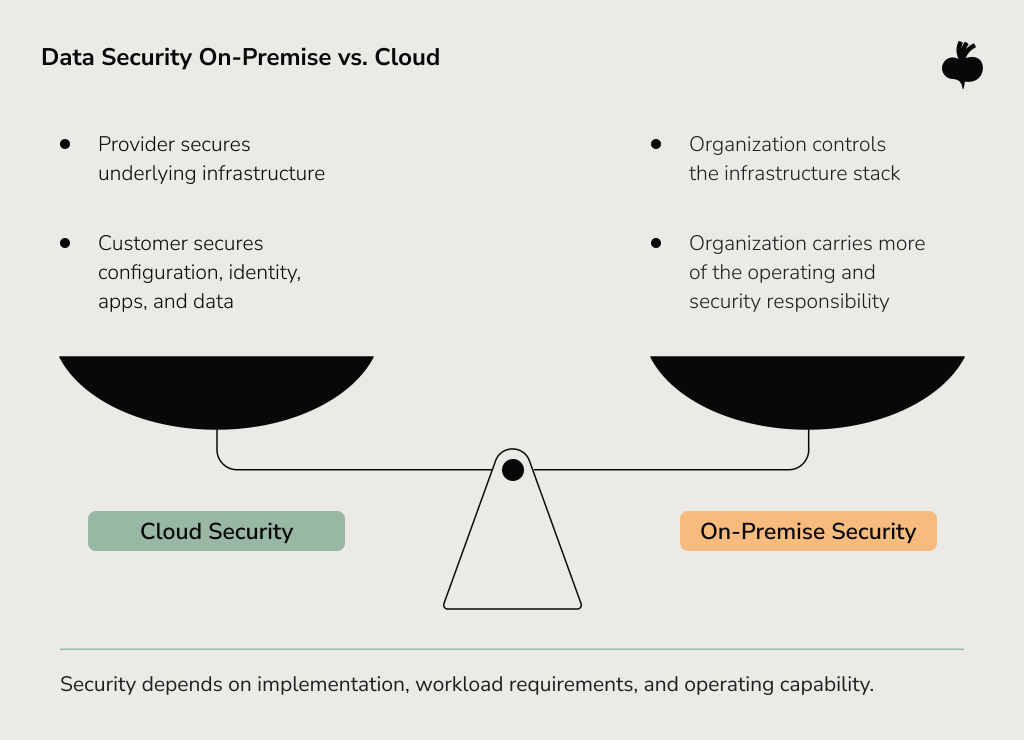
And yet — most serious cloud security incidents don’t happen at the infrastructure layer. They happen at the configuration layer. Misconfigured S3 buckets. Overly permissive IAM roles. Access keys are committed to public repositories. The provider can’t protect you from your own misconfigurations. That’s what the shared responsibility model actually means.
On-premise gives you control over the full stack. Regulated workloads can place additional constraints on infrastructure choices, including data residency, access controls, outsourcing requirements, encryption, auditability, and provider contracts. Those requirements may favor on-premises or private infrastructure in some cases, while suitably configured cloud services are appropriate in others.
The useful question isn’t “which is safer?” It’s two questions, asked honestly: what does my team have the capacity to secure well, and what do my compliance obligations actually require?
Scalability and Performance: Trade-Offs Between Cloud and On-Premise
The cloud generally makes elastic capacity easier to access, especially for workloads with variable or rapidly growing demand. Whether that advantage matters depends on the workload.
What’s worth examining is whether that applies to yours. The pros and cons of on-premises vs. cloud on scalability are more two-sided than the cloud-first narrative admits, and the exceptions are more common than you’d think.
Latency is the clearest example. Ultra-low-latency or highly deterministic workloads may favor on-premises, edge, or colocated infrastructure close to the systems they serve. Standard public-cloud regions can introduce network distance and variability that matter for some real-time trading, industrial-control, or latency-sensitive inference workloads.
Then there’s the noisy-neighbor problem. Multi-tenant cloud services can introduce performance variability in some configurations, although dedicated hosts, reserved capacity, and other isolation options can reduce that risk where consistent performance matters.
Cloud providers also go down. AWS experienced a major US-EAST-1 service disruption on October 20, 2025, triggered by a latent race condition in DynamoDB’s automated DNS-management system. The outage affected numerous major online services, including Netflix, Starbucks, and United Airlines, and large parts of the consumer internet for hours. It is a useful reminder that resilience still has to be designed at the application and architecture level.
For the bulk of workloads, web applications, analytics pipelines, dev environments, and most SaaS infrastructure, the cloud’s elasticity is the right call. The exceptions are worth identifying before a full migration.
Legacy System Migration to Cloud: When Is the Right Time to Move?
The timing of cloud migration matters more than most migration playbooks let on. And it tends to go wrong in two predictable ways.
Moving too early looks like this. You migrate a tightly coupled legacy system, hit unmapped dependencies at every step, spend months longer than planned in parallel runs, and end up with cloud costs that exceed the original on-premise budget because you replicated the existing architecture instead of rethinking it.
Waiting too long looks like this. Hardware is aging out, engineers spend more time on maintenance than new work, scaling requires budget conversations that keep getting deferred, and competitors who move faster are visibly pulling ahead.
Signals you’re ready: hardware approaching end-of-life with no clean refresh path, disaster recovery gaps that would take major capital to close, scaling constraints already slowing product velocity, remote access needs your current stack can’t handle securely at scale.
Signals it’s premature: compliance questions in the target cloud environment that haven’t been answered, deep system interdependencies that haven’t been mapped, and a team that hasn’t operated cloud infrastructure before. That last one is the most underestimated migration risk — fixable, but on a longer timeline than people budget for.
Cloud migration does not always require immediate re-architecture. Lift-and-shift can work for some workloads or migration phases, but moving an existing architecture unchanged may also carry its constraints and cost profile into the cloud.
Beetroot’s cloud consulting team works at this exact decision point, figuring out what to move, what to modernize first, and what to leave on-premises on purpose.
Hybrid Strategies: Integrating On-Premise and Cloud Systems
Most cloud vs. on-premise comparison articles skip the obvious: the majority of enterprise organizations aren’t running a pure version of either. They’re hybrid. And increasingly, hybrid is the deliberate strategy.
Nutanix’s 2024 Financial Services Enterprise Cloud Index projected that hybrid multicloud adoption in financial services would nearly triple over three years, from 18% to 50% as the primary IT model. Healthcare, logistics, and manufacturing show the same pattern. In hybrid environments, workload placement varies: latency, data residency, integration needs, existing investments, cloud-service capabilities, and operational requirements can all influence what stays local and what moves to the cloud.
The decision to integrate your on-premise and cloud systems is where the real architectural work begins. Cloud and on-premise integration means designing for data synchronization across environments, identity management spanning both stacks, reliable network connectivity (VPN, dedicated interconnect, SD-WAN, depending on latency and throughput needs), and observability across the whole picture.
For cloud and on-premise ERP software solutions, the friction point is usually the seam between on-premise financial data and cloud-based analytics. That seam needs proper design, a coherent data model, an access control framework, and a synchronization architecture that holds up as both environments evolve.
Cloud and on-premise integration is ongoing architectural work. Beetroot’s Amazon cloud consulting team supports hybrid architecture and integration across on-premises and cloud environments.
Decision Matrix: Choosing the Right Infrastructure Strategy
No table tells you exactly what to build. But working through these criteria against your actual workload data, compliance context, and team capabilities produces something more useful than gut instinct: a defensible position that survives contact with operational reality.
| Criteria | Favor Cloud | Favor On-Premise | Hybrid Approach | Key Consideration |
| Cost structure | Variable demand; growth-stage orgs avoiding CAPEX | Stable, high-utilization workloads; long-term TCO optimization | Cloud for burst; on-prem for predictable baseline | Model 3–5 year TCO |
| Compliance & data residency | Required security, regulatory, and residency controls can be met in the chosen cloud | Local control or isolation is required by the workload or policy | Workloads placed according to different regulatory, residency, or control needs | Map compliance before architecture |
| Scalability | Unpredictable demand; rapid growth; seasonal spikes | Consistent, predictable load with high daily utilization | On-prem baseline; cloud for overflow | Model actual demand patterns and growth scenarios. |
| Latency sensitivity | Apps tolerant of variable network latency | Sub-millisecond or real-time systems | On-prem or edge for latency-sensitive; cloud elsewhere | Test actual requirements — never assume |
| Team capability | Strong cloud ops skills in-house or via a partner | Experienced internal infrastructure team | Requires capability across both environments | Identify operating and skills gaps early |
| Disaster recovery | Multi-region redundancy; geo-distributed users | On-prem DR feasible given existing infra | Cloud as DR target for on-prem primary | RPO/RTO requirements drive the decision |
For most mid-to-large organizations, the question is about which workloads belong in which environment and then designing the integration architecture that holds the strategy together.
Making the Decision That Fits Your Organization
Organizations that end up with infrastructure they regret usually share one trait: they followed the prevailing trend rather than analyzing their own situation. Migration because it felt inevitable. Staying on-premise because change felt risky. Both lead to the same place — infrastructure that doesn’t fit the business it’s supposed to support.
A meaningful cloud vs. on-premise comparison starts with workload analysis, runs through honest TCO modeling, accounts for compliance context, and ends with an architecture your team can operate and evolve. The cloud and on-premises question is rarely about choosing a side. It’s about choosing the right combination.
If you’re working through that decision, or rethinking a strategy that isn’t delivering, Beetroot helps organizations design and implement custom infrastructure approaches, from cloud and on-premise integration architecture to phased migration and hybrid environment management. Get in touch to talk it through.
FAQs
Can cloud and on-premises systems be used together in a hybrid setup?
Hybrid infrastructure is common in mid-sized and enterprise environments where different workloads have different operating requirements. Workloads are distributed based on requirements: latency-sensitive or regulated data stays on-premises, while scalable or analytics-heavy workloads run in the cloud. Cloud and on-premises integration require deliberate architectural design around data synchronization, identity management, and network connectivity. A well-designed hybrid setup can combine control, compliance, and operational flexibility.
Is cloud infrastructure always cheaper than on-premises solutions?
Cloud infrastructure is not always cheaper than on-premises solutions. For organizations with variable or unpredictable workloads, the cloud’s pay-as-you-go model often delivers a lower total cost of ownership. For stable, highly utilized workloads over a multi-year period, on-premises infrastructure may be more cost-effective depending on hardware, facilities, staffing, resilience, and refresh costs. A reliable comparison requires a full TCO analysis covering hardware refresh cycles, staffing, cloud egress fees, and possible provider price increases.
How do total costs compare between cloud and on-premise infrastructure?
Cloud and on-premise infrastructure differ in cost structure and timing. On-premises requires significant upfront capital expenditure for hardware, licensing, and data center build-out, plus ongoing costs for support, power, cooling, and staff. Cloud operates as an operational expense with no upfront capital, but recurring monthly costs that scale with usage. Over five years, on-premise is often more cost-effective for predictable, high-utilization workloads. Cloud typically wins for variable demand or organizations avoiding capital-intensive refresh cycles.
Can legacy systems be migrated to the cloud without major disruption?
Legacy systems can be migrated to the cloud, but treating them as a simple lift-and-shift usually causes disruption. Successful cloud migrations involve thorough dependency mapping, targeted re-architecture, and parallel environments during transition. Organizations with tightly coupled legacy systems or unresolved compliance requirements in the target cloud environment face the most friction. A phased approach, migrating lower-risk workloads first, reduces risk and gives teams time to build cloud operations capability before tackling critical systems.
How should businesses choose between cloud and on-premise infrastructure?
Businesses should choose between cloud and on-premise infrastructure by evaluating factors specific to their own situation: workload characteristics (predictable vs. variable demand), total cost of ownership over three to five years, compliance and data residency requirements, latency sensitivity, disaster recovery needs, and internal capability to operate each environment. There is no universal answer. Many organizations use a hybrid approach when different workloads have different requirements, but a pure cloud or on-premises model can also be appropriate.
Subscribe to blog updates
Get the best new articles in your inbox. Get the lastest content first.
Recent articles from our magazine






Contact Us
Find out how we can help extend your tech team for sustainable growth.