

Contents
Contents
If your team is looking at cloud-based predictive analytics, there is probably a cloud data warehouse in place already, plus a couple of models that look promising in a notebook. Getting those models into production is a different job. Predictions have to reach the people who act on them, and the system has to keep working after the source data changes. Here is how that system is put together in the cloud, stage by stage.
What Is Cloud-Based Predictive Analytics?
Cloud-based predictive analytics is the practice of building and operating predictive models on cloud infrastructure, including the data pipelines that feed them and the integrations that put their output to use. The model itself is only one part of that system.
People often treat the term as a synonym for cloud-based analytics, though the two cover different ground. Cloud-based analytics is the wider environment for reporting, BI, and other analytical workloads. Predictive modeling is the part that estimates what is likely to happen next: demand for the coming week, say, or the chance that a particular customer cancels before renewal.
Cloud-based analytics platforms may already hold much of the history a model learns from, so a warehouse or data lake is often one of the starting points for predictive work. Ownership and adoption are a separate topic, and our guide to implementing predictive analytics for enterprises covers them in detail.
What the Cloud Changes
Mostly, the cloud changes speed and fit. A training job can run on large instances for an afternoon, and the instances are released when it finishes. Scalable data storage keeps years of history without anyone forecasting disk capacity.
Pipelines and deployments can also be version-controlled and automated, while run logging and experiment tracking can record the inputs and configuration behind every result. The practical implication: the route from experiment to working service gets shorter, provided your team plans that route on purpose.
What the Cloud Does Not Change
Prediction accuracy still depends on the data and on how well the problem is defined. Moving the same model to a bigger cluster leaves its error rate where it was. Quality comes down to whether the target outcome is recorded reliably and whether validation resembles the way the model will be used.
The Flexera 2026 State of the Cloud Report points in the same direction. Among cloud leaders, 40% named data quality for AI model training as a top challenge for cloud-based AI, second only to security and compliance at 53%. Build your timeline around data readiness, because more compute will not shorten that part of the work.
How Does Predictive Analytics Work in the Cloud? Step by Step
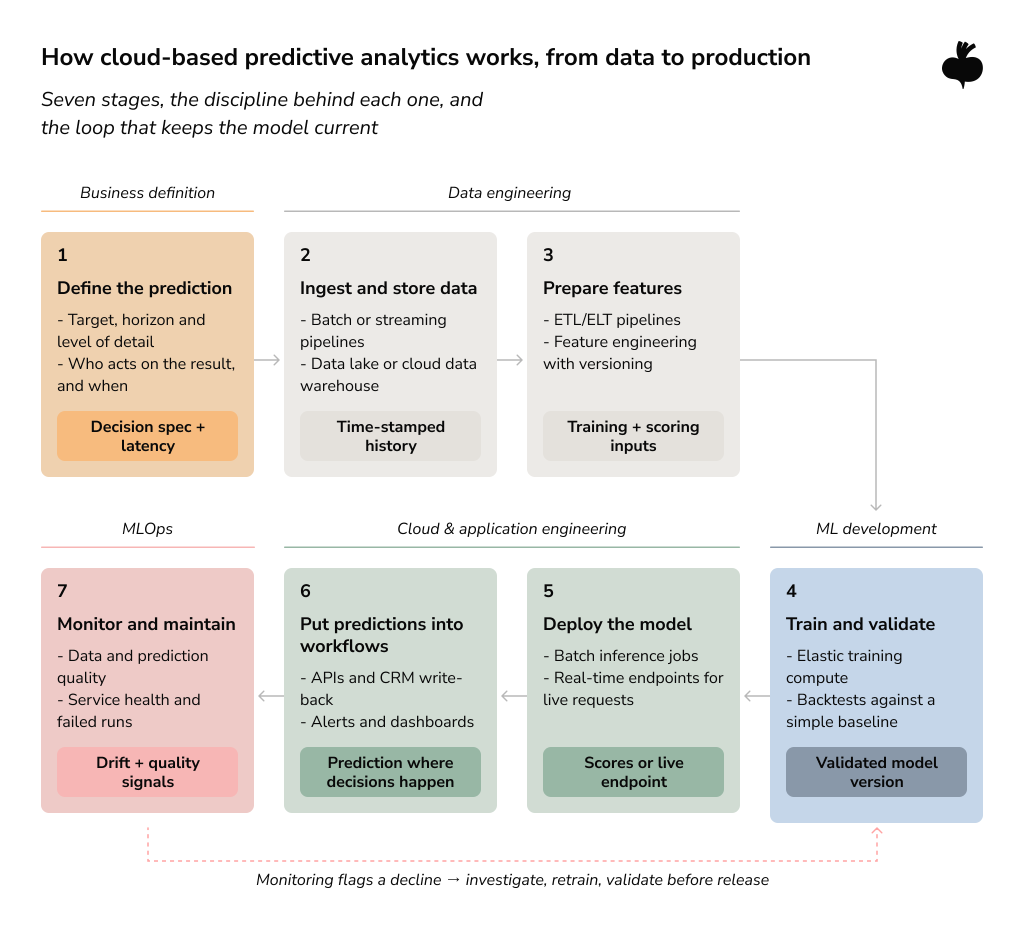
Predictive analytics in the cloud runs through seven stages, starting with the decision and ending with monitoring. An early weak link, such as patchy ingestion, limits everything downstream.
Step 1: Define the Prediction and the Decision
Begin with the decision the prediction is meant to support, and work back toward the model from there. Pin down what you are predicting, how far ahead, at what level of detail, and who will act on the number. A 24-hour forecast for each grid node and a weekly regional forecast may use similar algorithms. Their architectures will look very different, which is why these answers should come before any choice of cloud service.
Step 2: Ingest and Store the Data
Ingestion pipelines carry data from operational databases and event streams into storage that models can read. For sources refreshed hourly or overnight, a batch tool such as AWS Glue is usually enough. Continuous events, like clickstreams or meter readings, need a streaming service such as Amazon Kinesis when models need to act on them within seconds.
From there, the data lands in data lakes, which keep raw files at low cost, or in cloud data warehouses built for structured queries. Whatever the destination, keep the original timestamps. A forecasting model has to learn from what was known at each moment, and losing that temporal context can make it easier to include future information into training without anyone noticing.
Step 3: Prepare Features for the Model
Feature engineering turns cleaned data into the inputs a model learns from. A rolling seven-day sales average is a typical example. ETL/ELT pipelines handle the cleaning and joining. With ETL, data is transformed before it is loaded. ELT loads it first and does the transformation inside the warehouse.
One constraint deserves attention early. Training and prediction must compute features with identical logic, or you get training-serving skew: the model sees inputs in production that differ from what it learned on, and accuracy slips with no error message to warn anyone. Versioned feature definitions make that kind of gap much easier to trace.
Step 4: Train and Validate the Model
Training is where machine learning in the cloud differs most from fixed infrastructure. A model might need heavy compute for one short run, then almost nothing for weeks. Managed platforms like Amazon SageMaker AI and Azure Machine Learning run these jobs and can log the parameters and metrics for every experiment.
Validation then decides whether a version is ready for release. For time-series models, that means backtesting on rolling windows. It also means comparing each candidate with something simple, such as last week’s value carried forward. A sophisticated model is worth its upkeep only if it beats that baseline by a margin the business can use.
Step 5: Deploy the Model for Batch or Real-Time Predictions
Deployment packages the model so it can score new data, either on a schedule or on request. Scheduled scoring is batch inference, and AWS positions SageMaker AI batch transform for situations where no persistent endpoint is needed. Real-time inference answers individual requests through an endpoint that stays on.
Training and inference are separate workloads with different hardware needs. A model retrained weekly on GPU instances can often be served from a far smaller CPU instance. Plan model serving as a separate workload.
Step 6: Put the Prediction Into a Real Workflow
A prediction becomes useful when it reaches the person or system that acts on it. Sometimes that is a REST API called by an application. In other cases it is a churn score written into the CRM record a retention manager opens each morning.
This step involves backend and integration work and coordination with the team whose process will change, and it can take longer than the modeling itself. When predictions need to live inside a product, scope the work as cloud application development.
Step 7: Monitor and Maintain the System
Model monitoring follows input data shifts and compares predictions with observed outcomes. Service health matters too, mainly endpoint latency and failed pipeline runs. Monitoring shortens time to detection. A flagged decline still needs investigation before anyone retrains, because drift can start with a broken upstream feed just as easily as with a real change in customer behavior.
Automated retraining helps with changing data patterns under two conditions: each new version passes the same validation as the first, and you can roll it back. Along with monitoring, versioning, and repeatable deployments, these controls are part of daily MLOps work. Implementing MLOps practices early helps your team release model updates with less manual coordination.
Batch or Real-Time Cloud-Based Analytics: Which Fits Your Decision?
Let the timing of the decision set the prediction latency. A good architecture is the simplest one that gets the prediction there in time. Our article on when real-time data becomes a business advantage goes deeper into the streaming side.
When Batch Prediction Is Enough
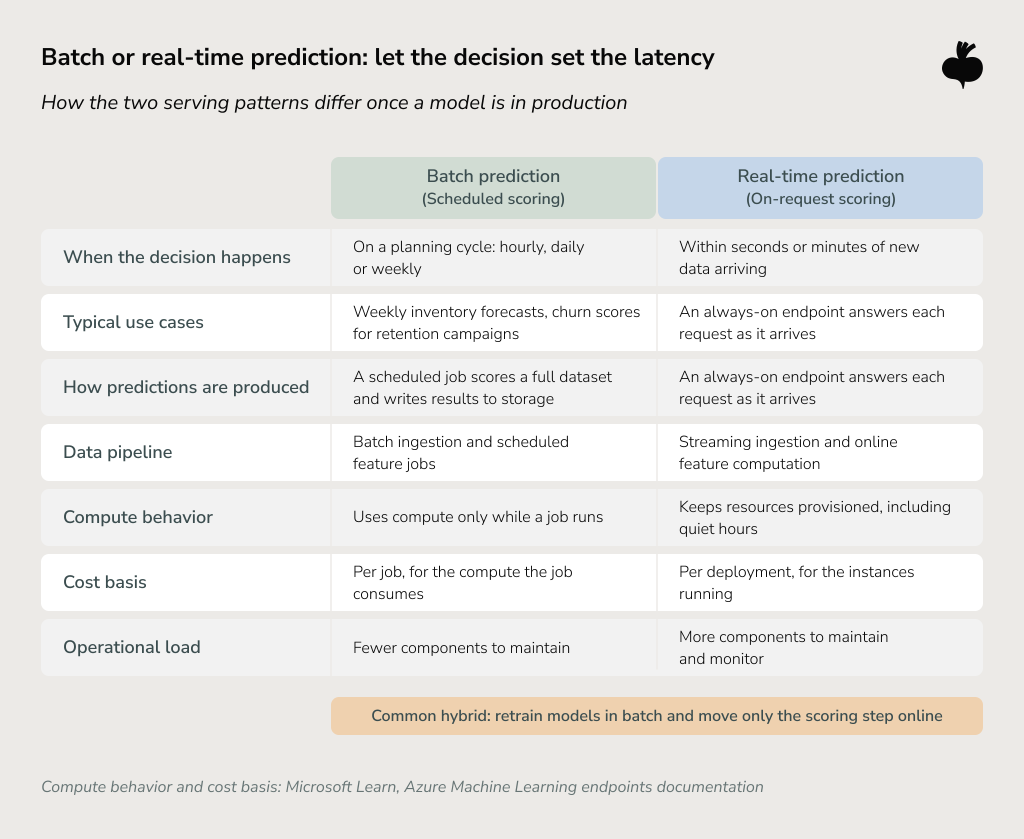
Batch prediction is enough when decisions follow a planning cycle. A retailer that places orders every Thursday gains nothing from scores updated every second. Cost behavior favors batch here too: according to Microsoft’s documentation on Azure Machine Learning endpoints, batch deployments use compute only while a job runs, whereas online deployments keep resources provisioned. For planning use cases, a monitored daily pipeline is a mature architecture in its own right.
When Real-Time Prediction Matters
Real-time prediction is worth the added infrastructure when new information must change a decision within seconds or minutes. Card fraud scoring is the obvious case. Equipment alerts built on live sensor readings are another.
The price is operational. Streaming ingestion adds components to maintain, and a provisioned online endpoint is billed even during quiet night hours. One common compromise retrains in batch and moves only the scoring step online, which keeps the real-time footprint small.
Common Predictive Analytics Models and What They Need From the Cloud
Production use cases tend to fall into a handful of model families, and each one asks something different of the data pipelines and of inference.
Forecasting and Regression
Forecasting and regression models predict a number, such as hourly energy demand or next month’s sales for one store. They depend on long, consistent time-series history. External drivers such as weather or public holidays must align to the same time grain as the target.
Some warehouses can do this work in place. BigQuery ML supports ARIMA_PLUS time-series models through SQL. If your forecast refreshes once a day, check whether in-warehouse modeling covers it before building a separate serving stack.
Classification and Probability Scoring
Classification models estimate the likelihood of an outcome. Will this customer churn? Will this pump fail within 30 days? Models of this kind train on labeled warehouse and CRM history, which makes the label definition as important as the algorithm. Churn scores are often refreshed daily. Credit and conversion scoring may need on-demand inference at the moment of application.
Anomaly Detection
Anomaly detection looks for observations that break from the expected pattern, such as an unusual transaction or a sensor reading outside its normal range. Confirmed anomalies are rare in most datasets, so these models usually learn what normal looks like and score how far each new point departs from it. Flagged events often still need human review or another validation step, especially when the score is borderline or a wrong call would be costly. Budget for that step along with the model.
Benefits and Trade-Offs of Predictive Analytics in the Cloud
The cloud can make predictive systems easier to provision and scale, but these benefits come with architectural and operational trade-offs.
Elastic Compute Without Permanent Capacity
Elastic compute suits ML workloads because their demand is uneven. Training needs large compute in short bursts; inference volume rises and falls with business activity. Idle endpoints and oversized clusters keep generating charges regardless.
Flexera’s 2026 report ties surging cloud-based AI workloads to “an increase in wasted cloud spend (29%) for the first time in five years.” Treat cost as a design input from the first sprint. Our guide to managing cloud operational costs covers rightsizing in more detail.
Managed Services Reduce Some Operational Work
Managed services take over some infrastructure work like server maintenance or cluster scaling, depending on the provider. Your team still makes the decisions: how models are validated and who signs off on a release.
The services themselves also change over time. AWS has closed Amazon Forecast to new customers. In April 2026, Google announced that Vertex AI services will be delivered through its Gemini Enterprise Agent Platform. Check current documentation before you tie your architecture to any one service.
Easier Integration Can Increase Provider Dependency
Tightly integrated services speed up the first build and complicate any later move, since code written against a provider-specific SDK has to be reworked to run elsewhere. Containerized serving and open formats such as Parquet reduce that effort where portability is a stated requirement. Multi-cloud makes sense when it answers a specific need, data residency being a common one, because every added provider brings its own networking and security work.
Security and Governance Still Need Deliberate Design
Cloud providers secure the underlying infrastructure. Who can reach data and models on top of it remains your team’s responsibility, which in practice means access roles defined per pipeline, plus encryption at rest and in transit. Log which model version produced each prediction. Put these controls into the first release, since retrofitting access policies onto a running system is slower and riskier.
AWS vs. Azure vs. Google Cloud for Cloud-Based Predictive Analytics
For a predictive analytics cloud setup, all three major providers cover the full lifecycle. The better fit usually comes down to the environment you already run, more than to feature lists. These are the criteria worth weighing:
- Where your data lives today. Moving large datasets between clouds adds egress costs and latency, giving the provider hosting your warehouse a head start.
- Your enterprise stack. Teams standardized on Microsoft tools may find Azure Machine Learning simpler to govern. With data in BigQuery, BigQuery ML is a reasonable first step.
- The inference patterns you need. Amazon SageMaker AI, for example, offers several endpoint types, serverless and asynchronous options among them, alongside batch transform.
- Team expertise and portability. Engineers who know a provider well deliver faster on it, and regional or portability requirements can narrow the choice further.
Our article on when AWS is the right cloud for AI looks at one provider in depth, including the cases where another option may suit you better.
Real-World Uses of Cloud Predictive Analytics
The same lifecycle turns into quite different architectures depending on how fast the data arrives and where the prediction ends up.
Demand and Time-Series Forecasting
Our predictive analytics project for a European renewable energy company shows the layers working together. The client needed 24–48-hour forecasts of energy consumption and solar production inside its existing AWS environment. ETL workflows built with Apache Airflow and Amazon S3 bring IoT sensor data and weather feeds together with grid load metrics. Hybrid gradient boosting and LSTM models produce the forecasts.
Energy dashboards and partner APIs get RESTful access to the predictions through a FastAPI microservice on AWS ECS. Grafana dashboards track performance, and automated retraining pipelines help manage seasonal or regional drift. After 12 months in production, the case reports 85–89% accuracy for 24-hour demand and solar generation predictions.
Predictive Maintenance and IoT
Predictive maintenance models estimate failure risk from equipment telemetry such as vibration and temperature readings. If maintenance crews are scheduled weekly, batch-scoring the telemetry is usually sufficient. A fault that can damage equipment within minutes is another matter: there, streaming ingestion and online scoring become necessary.
Customer and Revenue Prediction
Churn and lifetime value models train on warehouse data that combines transactions with product usage. Their scores typically go back into the CRM once a day. The heavier engineering work is in data joins and in that sync back to business tools, which is why a solid data engineering foundation matters more here than serving latency.
Risk and Anomaly Detection
Fraud scoring needs low latency because the decision is made while the transaction is still in progress. Streaming features and an online endpoint sized for peak traffic are the usual answer. Real-time scoring flags suspicious activity inside the authorization window, so review or step-up verification can begin before any funds move.
How to Get Started With Cloud Predictive Analytics
Start from the prediction requirement, and prove its value before scaling the infrastructure around it. Each of the steps below narrows the options for the next one.
Step #1: Define a Use Case With a Measurable Decision
Pick one prediction where you know who will use it and what they will do differently. For example, reducing stockouts through better weekly forecasts has a clear owner and a metric.
Step #2: Assess Data Readiness
Check how much history you have and how often each source refreshes. Above all, confirm that the outcome you want to predict is recorded consistently. A churn model is hard to build when departments define churn differently.
Step #3: Choose the Simplest Suitable Architecture
Choose batch or real-time based on decision latency. A daily batch job reading from your existing warehouse is a perfectly valid first production architecture.
Step #4: Validate the Model Before Scaling Infrastructure
Make sure the model beats a simple baseline on realistic backtests, and test its predictions with the people who will use them. If the value is still unclear, revisit the use case or the data before adding infrastructure.
Step #5: Build Production Integration and MLOps
Once the model has proved its value, add repeatable pipelines and versioning. Monitoring comes next, together with integration into the target application. This is where backend and MLOps engineers join the data scientists on the project.
Step #6: Optimize Cost and Architecture With Real Usage Data
After a few months in production, compare endpoint utilization and training frequency with real traffic. Those numbers show where resources can be right-sized, or where scoring could move to batch.
How Beetroot Helps Build Cloud-Based Predictive Analytics
At Beetroot, we help data and engineering teams build cloud-based predictive analytics around their own systems and requirements. We work inside the cloud environment you already have, from use-case definition through deployment and integration into your products. Depending on the use case, our work can combine predictive analytics solutions with data engineering services and MLOps.
Our engineers can build the APIs that bring predictions into your applications. Our data analytics services help connect those predictions to the reporting your teams rely on. When documentation and handover are in scope, we support your team in taking over a production system that it can operate and extend.
Cloud-Based Predictive Analytics Delivers Value as One Connected System
Cloud-based predictive analytics delivers value when data pipelines, training, serving, and monitoring work as one system, with each part sized to the decision it supports. McKinsey’s The State of AI in 2026 reports that 44% of respondents now see AI scaling across their enterprise, compared with 38% a year earlier. As more predictive use cases leave the pilot stage, the production engineering around models and applications needs as much planning as the model itself.
A sensible first move is to check your data against the cloud environment you run today. If you are weighing where to start, our team can help you scope the use case and shape an architecture that fits your setup. Let’s talk.
FAQs
What is cloud-based predictive analytics?
Cloud-based predictive analytics is the practice of building and operating predictive models on cloud infrastructure, together with the data pipelines and monitoring that keep those models usable in production. Cloud-based predictive analytics differs from general cloud-based analytics because it adds a modeling layer that estimates likely future outcomes on top of reporting and BI.
How does predictive analytics work in the cloud?
Predictive analytics in the cloud works as a lifecycle that ingests data into cloud storage, prepares features, trains and validates a model, and serves predictions in batch or in real time. Monitoring and controlled retraining then help keep the deployed model aligned with changing data, with each new model version validated before it replaces the production version.
What are the main components of a cloud predictive analytics architecture?
A cloud predictive analytics architecture typically includes data ingestion pipelines, scalable data storage such as a data lake or cloud data warehouse, feature engineering, model training with a model registry, and a serving layer for batch or real-time inference. Monitoring, access controls, and integration with the applications that consume predictions complete the architecture.
When should predictive analytics use batch processing instead of real-time predictions?
Batch prediction fits when the business decision runs on a planning cycle, such as weekly inventory forecasts, because scheduled scoring delivers the prediction before the decision is made. Real-time prediction justifies its additional infrastructure when new information must change a decision within seconds or minutes, as in card fraud scoring or equipment alerts.
Is cloud-based predictive analytics secure for enterprise data?
Cloud-based predictive analytics can meet enterprise security requirements when security controls are designed into the architecture: identity and access management, encryption at rest and in transit, network boundaries, secrets management, audit logging, and data-governance controls for the workload. Under the shared responsibility model, the cloud provider secures the underlying infrastructure, and the organization remains responsible for configuring these controls around its data and models. Beetroot’s predictive analytics work includes designing these controls into the pipelines, aligned with each client’s governance requirements.
Subscribe to blog updates
Get the best new articles in your inbox. Get the lastest content first.
Recent articles from our magazine





Contact Us
Find out how we can help extend your tech team for sustainable growth.