
How to Automate Customer Support: From Intent-Based Chatbots to AI-Powered Workflows
- July 28, 2026
- 10 min read
- AI/ML


Contents
Contents
Most support teams reach a familiar point. Ticket volume is up, hiring hasn’t kept pace, and someone suggests a chatbot to take the pressure off. It goes live and handles predictable questions well — think FAQs, order status requests, password resets, or policy checks. But if the queue still feels heavy a few weeks later, the issue is not that the chatbot failed — it is that many support requests do not stop at an answer. They need context from other systems, a workflow step, or a handoff to a human agent who can make a judgment call.
That is where AI customer support has been moving over the past two years: from scripted question-and-answer flows toward systems that retrieve approved knowledge, work across connected tools, and involve human agents when a request needs judgment, empathy, or a higher level of accountability.
Freshworks’ 2025 benchmark reflects the pressure on support teams: 53% of customer service practitioners named managing ticket volume without growing headcount as their top challenge, while AI agents now deflect over 45% to 50% of incoming queries, depending on the sector. Those numbers suggest that deflection is doing real work. But they also raise the next question: once routine requests are handled, how do you automate the workflow steps that still consume agents’ time?
The useful questions are practical ones: when a chatbot is still the right call, where customer support automation actually earns its keep, and what needs to be true about your infrastructure and governance before software can safely act on a customer request. None of this is about replacing your support team. It’s about knowing where to automate customer support, and where to keep people in the loop.
Choosing the Right Level of Customer Support Automation
Customer support automation is a spectrum, and each point solves a different problem. Pick the wrong one, and you get a tool that works on paper but disappoints in practice. Four broad approaches sit along it:
- Rule-based chatbots run on decision trees and keyword triggers. They’re fast to deploy, less expensive to run, and reliable for a narrow set of predictable questions.
- Conversational AI assistants use natural-language understanding, the kind built through NLP development services, to handle varied phrasing and messier questions. This is where conversational AI support starts to feel genuinely helpful rather than robotic.
- Retrieval-augmented support systems ground their answers in your documentation through retrieval-augmented generation (RAG), so responses come from verified product content and internal knowledge sources.
- Workflow-oriented AI systems coordinate steps across connected tools, such as checking an order, updating a record, triggering a refund, or escalating a case when it falls outside the rules.
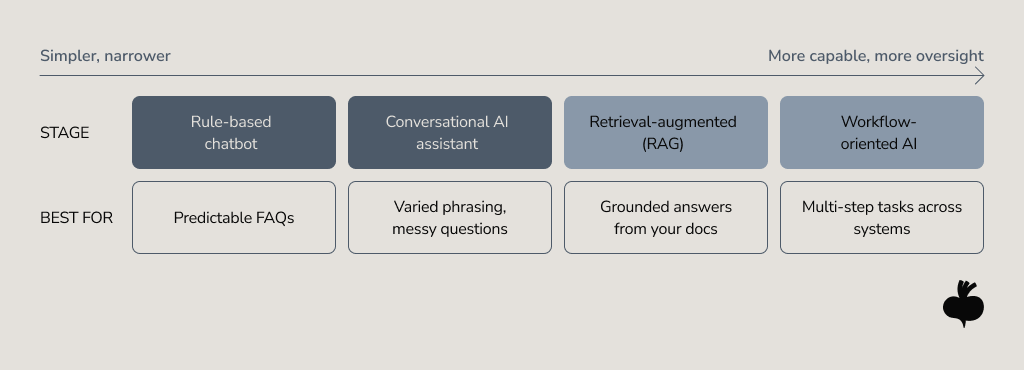
There is no inherently “better” option. A password reset is best handled with a rule-based approach, while a billing dispute across multiple systems needs a different method. The key is to match the approach to the task and to choose simpler solutions when possible to save costs. As Gartner analyst Anushree Verma puts it, “Many use cases positioned as agentic today don’t require agentic implementations.”
Where Chatbots Help, and Where They Hit a Wall
Traditional chatbots earned their place in support operations. For structured, high-volume, repetitive requests, they can still be the right tool to handle simple policy questions, FAQs, password resets, order status checks, or appointment changes. When the question is bounded and the answer is predictable, a well-built bot can resolve it instantly, outside business hours, without adding another ticket to the queue. Salesforce found that 61% of customers prefer self-service for straightforward issues, which is exactly the territory a well-built bot owns.
The limits show up the moment a request stops being predictable. Scripted bots tend to struggle when a question:
- Requires context that the bot can’t see: the customer’s account history, order details, or past tickets.
- Spans multiple systems: checking a CRM, then a billing platform, then a shipping provider.
- Involves several steps that depend on each other.
- Falls outside the script, leaving the customer stuck in a loop with no clean path to a person.
That last point is what customers remember. A bot that misunderstands the request and offers no useful way forward can create more frustration than no bot at all. Chatbots remain useful for what they were built to do. Beyond that, the harder cases are where customer service automation needs stronger context and clear escalation paths to be effective.
How Agentic Workflows Move Customer Support Beyond the Chatbot
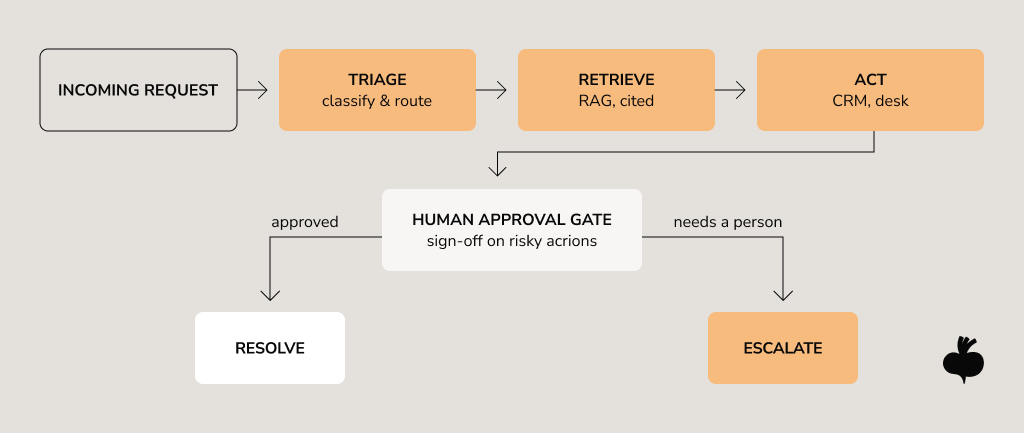
The shift over the past two years is from software that only answers to software that can support a process. A workflow-oriented system treats a request as work to be completed: pulls the relevant policy and account history, retrieves order details through an integration, and uses generative AI services to draft a grounded, sourced response. Anything high-impact goes to a human for approval first.
This is where the term agentic workflows comes in, and it needs careful definition. “Agentic” means a system that coordinates multiple tasks within predefined workflows, under business rules and human oversight. Unlike older support workflow automation, which fires a fixed sequence, it decides which step fits each case: routing an invoice calculation to a tool, a policy question to RAG, and a refund above a threshold to a person.
Four building blocks make this practical:
- Retrieval (often through RAG) grounds answers in trusted, up-to-date knowledge sources — one of the biggest levers for reducing hallucinations and keeping responses consistent.
- Orchestration keeps the system controllable and observable, so you can trace what happened and why.
- Integration connects the AI to the systems where work happens: the CRM, help desk, billing platform, and fulfillment system.
- Intent classification estimates the emotional background across the chat and helps to classify whether the question can be resolved by the piece of information from the knowledge base or should be passed to the manager for resolution.
A realistic pattern looks less like a single all-knowing agent and more like an assembly line: extract the request, validate it against policy, retrieve the right context, draft a response, submit with a human approval gate wherever the action is risky or irreversible. That’s what separates a demo from something a support team can run on a Monday morning.
The Use Cases Worth Automating First
Automation pays off fastest where work is repetitive, rules are clear, and the data already exists. McKinsey’s insights into AI-powered “next best experience” in customer interactions suggest that companies using AI-powered engines capable of detecting when a customer needs help before they even realize it can improve satisfaction by 15-20%, increase revenue by 5-8%, and reduce cost-to-serve by 20-30%. These “engines” are properly calibrated AI models connected to integrated customer lifecycle data that can drive insights and actions to optimize CX, revenue, and costs.
The strongest starting point for customer support teams considering automation is usually the workflows where AI can reduce manual effort without taking over sensitive decisions. These four use cases are typically where teams see returns early.
Intelligent Ticket Triage and Routing
AI reads an incoming ticket, classifies it by topic and urgency, detects sentiment, and routes it to whoever is best equipped to handle it. When done well, support ticket automation strips out the manual sorting that eats up agent hours and keeps tickets from bouncing between the wrong queues.
Automated Knowledge Retrieval
Most correct answers already exist somewhere: a help center, product documentation, an internal runbook, or a support policy. The challenge is surfacing that knowledge fast and making it useful in the context of the customer’s request. A retrieval layer pulls from approved sources and turns relevant content into either a customer-facing draft or a suggested response a human agent can review and send. RAG-based retrieval is only as good as what it retrieves from: if the source material is outdated, contradictory, or poorly structured, automation will only surface those weaknesses faster.
Workflow Automation Across CRM and Help Desk Systems
Instead of only replying, the system can update permitted customer record fields, tag a ticket, trigger a follow-up, or queue a return for approval, coordinating steps across the CRM and help desk so that an agent doesn’t have to stitch them together by hand. CRM integration turns a helpful answer into an operational step. It’s also where governance matters most, which is why mature setups put approval gates on anything that changes data or moves money.
Customer Self-Service at Scale
Put retrieval, triage, and workflow automation together, and self-service stops being a static FAQ page. For many routine requests, it can give customers a complete answer or a finished action without opening a ticket, with a clear path to a person when the request goes beyond what the system is set up to handle. One caveat isn’t optional, though: customer self-service only works when answers are accurate, source content is maintained, and escalation is easy to find.
The strongest self-service also learns from support analytics: when teams can see where demand and friction are building, they can improve help center materials, adjust workflows, or surface answers before customers go looking for them, reducing tickets that would otherwise land in the queue.

The Foundations Chatbot Automation Depends On
Behind many disappointing automation projects, the AI model is rarely the whole story. The foundation matters just as much: the knowledge, integrations, and rules the system runs on. Before you scale, a few things need to be in place:
- Knowledge quality. If your documentation is outdated, contradictory, or scattered, automation will quickly reveal those gaps. Neat, current knowledge is the prerequisite.
- System integrations. Automation that can act needs reliable, secure access to your CRM, help desk, and backend systems. Underspecified integrations are a common reason projects stall between pilot and production.
- Escalation rules and human-in-the-loop design. Decide in advance which decisions need human sign-off, what triggers an escalation — a low confidence score, a value threshold — and how a person steps in. These oversight points belong in the architecture from day one.
- Governance and observability. Audit trails, decision logs, and ongoing monitoring let you see what the system did, catch failures early, and answer for outcomes. Treat compliance as a design feature, not a final review step.
This readiness gap is what the alarming headlines are about. The same Gartner research that flagged overhyped use cases also predicts that more than 40% of agentic AI projects will be scrapped by the end of 2027, citing cost pressures, unclear business value, and governance gaps. The projects that survive are not necessarily the most ambitious. They’re the ones with solid foundations, bounded scope, and measurable outcomes.
Common Mistakes in Customer Support Automation
The failure patterns are familiar across teams and industries. A handful show up again and again in customer support automation projects:
- Over-automating. Pushing AI into emotionally charged or complex cases, such as cancellations, complaints, billing disputes, or sensitive accounts, without a clear path to a person when customers need human support. More automation isn’t the goal; the right automation is.
- Building on a weak knowledge base. Messy, outdated, or contradictory source content produces unreliable answers, often with the same confidence as correct ones.
- Removing human oversight. Letting the system take consequential actions without approval gates is how a small error becomes a larger operational or reputational issue.
- Treating customer support as a core part of the business. Creating layers, defining what can be automated, what should be automated, and catching the moment when a human needs to step in is the best approach.
- Leaving workflows disconnected. An AI system that answers but cannot act or see the right account context traps customers between channels and creates more work than it saves.
- Ignoring intent classification. The same question may have a different emotional background. Continuous emotion tracking within a chat may use additional tokens for classification, but you’re less likely to miss the right moment to bring in a human.
A Practical Path to Scaling AI Customer Support
A strategy that holds up under volume tends to follow the same arc, whatever the team size.
- Find the right use cases. Map your ticket volume for high-frequency, low-complexity, well-documented requests. That is where automation delivers value with the least risk
- Start narrow, measure, expand. Scope a focused pilot, instrument it with clear metrics, and grow in measured steps. Broad “all-in” rollouts are much harder to govern once they reach production.
- Design for the handoff. Build escalation and human review into the workflow from the start, so the system knows its limits and customers never feel trapped.
- Decide what to build versus where to bring in help. Off-the-shelf tools handle generic cases; automation tailored to your workflows and CX goals usually needs custom design.
Often, this is when teams transitioning from basic chatbots to workflow automation bring in a development partner. Beetroot provides custom AI chatbot development and AI agent development services for organizations that need systems shaped around their existing support operations, with secure integrations, human oversight, and team enablement built in. The goal is a system your team can manage, improve, and scale over time.

What Makes AI Customer Support Work Beyond the Chatbot
The teams seeing real returns from AI customer service are not simply adding a chatbot or connecting a model to a help desk. They are treating automation as a design question: which level fits each request, how well answers are grounded in trustworthy knowledge, whether the system connects to operational tools, and when a human needs to stay in the loop.
Customer support automation depends on four things: workflow design, knowledge management, integrations, and governance. Start where the value is clear, build on foundations that can hold the weight, and expand as evidence and trust grow. And if you’re thinking about moving from a stalled bot to support workflows your team can rely on, the work is worth doing carefully. It also helps to have a partner with a proven track record of similar projects. If that’s where you are today, let’s talk about what custom AI and chatbot development could look like to support your needs.
FAQs
What is the difference between a chatbot and an AI support agent?
A chatbot follows predefined rules or scripts to answer common, predictable questions, while an AI support agent uses natural language understanding, knowledge retrieval, and workflow orchestration to handle varied requests and complete multi-step tasks. The key difference is that a chatbot mainly responds with information, whereas an AI support agent can take actions across connected systems under human oversight.
How can AI automate customer support workflows?
AI automates customer support workflows by classifying and routing incoming tickets, retrieving grounded answers from approved knowledge sources, updating permitted records across CRM and help desk systems, and escalating complex cases to human agents. Each step runs under predefined business rules, so AI handles repetitive work while people review high-impact or sensitive decisions.
Which customer support tasks should not be automated?
Customer support tasks that involve emotional sensitivity, complex judgment, or high financial, legal, or account risk should not be fully automated without human oversight. Examples include complaint resolution, account cancellations, billing disputes, and any decision that is irreversible or requires empathy, where human agents should remain responsible while AI provides assistance.
How do AI support systems integrate with CRM and help desk platforms?
AI support systems integrate with CRM and help desk platforms via secure APIs, permission controls, and workflow rules that enable the system to retrieve customer context, update tickets, trigger follow-ups, or queue actions for approval. These integrations should also keep an audit trail of automated steps, so that support teams can monitor, review, and improve the workflow.
What metrics should businesses use to measure customer support automation success?
Businesses should measure customer support automation success using ticket deflection rate, first response time, resolution time, first-contact resolution, escalation rate, cost per ticket, and customer satisfaction (CSAT). Tracking these metrics before and after implementation shows whether automation reduces manual effort and cost without lowering the quality of the customer experience.
Subscribe to blog updates
Get the best new articles in your inbox. Get the lastest content first.
Recent articles from our magazine




Contact Us
Find out how we can help extend your tech team for sustainable growth.